
Microsoft Minesweeper
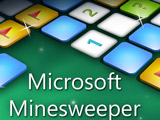
In Microsoft Minesweeper, the old Windows puzzle comes back online with updated graphics and sound after more than twenty years on computers. Mouse and keyboard input still drive the action. Covered squares hide bombs and safe spaces across the board. Numbered tiles point to nearby danger by showing how many mines touch that square. Beginner layouts lead into expert boards, so the grid grows harder to read as the field gets tighter. This free logic game sticks to the same pressure that made it last for decades: reveal every safe tile without setting off a mine.
How to play?
Your first reveal is always safe, which gives you a starting point to read the board. On the grid, left-click a covered square to uncover it and inspect the clues around it. Right-click any tile you suspect of placing a flag, then click that spot again if you want a question mark there instead. Once the flags around a numbered tile match its clue, double-click the number, press both mouse buttons, or hit the wheel button to uncover the touching squares together. If part of the field sits out of view, drag the mouse to move across the board in any direction. Use the scroll wheel to zoom in or out, and check the mine counter and timer beside the board as the match continues.
 - open
 - checkbox
About this game:
- Players have rated this game 3.81 out of 5, based on 187 votes.
- Released in April 2021.
- Ready to play on Web Browser (PC) and Android/iOS (Mobile).
- Age rating: 6+
- Powered by HTML5 — jump right in and start playing in your browser, no downloads needed.
Game features:
- Use first-click safety to get a free opening read on the field.
- Mark doubtful tiles twice to swap a flag for a question mark.
- Chord numbered clues with matched flags to uncover touching squares fast.
- Drag across oversized minefields to inspect distant parts of the board.
- Zoom with the mouse wheel when dense expert layouts crowd the grid.
Related Games:
 Gravity Control
 Cyberweb
 Switch the Bulb
 Phone Charging 2
 DOP 2: Delete One Part
 Comics Bob
 Candy Galaxy
 Sugar, Sugar 3
 Paper Fold Origami
 Nuts Puzzle: Sort By Color
 Popping Sushi
 Platformaniac
 Luminara
 Stretchy Stickup
 Worms
Worms Frog Rush
 HitBox
 Sliding Blocks
 Black Puzzle
 Railway Panic
 Wooden Path
 Find The Pair
 Forest Monsters
 Get 10 Plus