
Mr Bean Splash Art
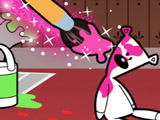
Mr Bean Splash Art turns a simple coloring page into a full-on art room with Mr. Bean hanging out on every picture. The game is based on the classic TV cartoon style, so the drawings look close to what kids see on screen. Players switch between structured coloring pages and a looser drawing mode, so it works for both careful coloring and quick doodles. Color scenes with Mr. Bean and familiar characters, or open a blank canvas and sketch something new next to him. The Mr Bean coloring pages include more than five ready-made images, so the game does not repeat the same picture right away. Some scenes focus on his goofy poses, while others place him with friends.
How to play?
Pick a mode first. In coloring mode, select one of the Mr. Bean pictures, then tap colors to fill in areas. Swap between pencils for cleaner outlines and softer fills, or tap the spray tool for a wider paint effect. Add glitter when a part of the drawing needs extra highlight, like accessories or background details.
Switch to free-draw mode to work on a more open picture, with Mr. Bean already on the page. Draw extra objects around him, change his outfit colors, or fill the space with patterns. Save a finished Mr Bean Splash Art image to keep it for later or compare several color versions. Younger kids usually color big areas first, while older players experiment with details and layering tools. Jump into Mr Bean Splash Art, test both modes, and keep tweaking pictures until the cartoon-style art board looks exactly how you want.

About this game:
- Players have rated this game 4.02 out of 5, based on 104 votes.
- Released in March 2022.
- Ready to play on Web Browser (PC) and Android/iOS (Mobile).
- Age rating: 3+
- Powered by HTML5 — jump right in and start playing in your browser, no downloads needed.
Game features:
- Two distinct modes: structured Mr. Bean coloring pages and a more open free draw option
- More than five preset cartoon-style images based on Mr. Bean and supporting characters
- Toolset that combines pencils, spray paint, and glitter for different visual effects
- Free draw mode starts with Mr. Bean already on the page so players expand around him
Tips & Tricks:
- Use pencils first to outline areas, then switch to spray for faster filling.
- Save separate versions of the same picture when testing new color ideas.
- Add glitter only to small details so the main Mr. Bean drawing stays clear.
Related Games:
 Baby Elephant Coloring
 Painting 3D
 Coloring Book for Kids: Cartoons
 Rainbow Friends Coloring Book
 Coloring Multi Animal
 Coloring Book Free
 Halloween Coloring Games
 Zentangle Coloring Book
 99 Nights in the Forest Coloring Pages
 Color Me Girlsplay
 Let's Create with New Looney Tunes
 Color With Numbers
 Pixel Mania
 Kids Color Book
 Spirit Riding Free: Animated Coloring Book
 Fruit Paint
 Decoration Book
 New Year's Coloring Book 2025
 Lalafanfan Coloring
 Sand Painting: Summer Holiday
 Arts and Crafts: Wabbit
 Sneaker Art
 Puss in Boots Coloring
 Pigs Coloring Book