
Fruit Paint
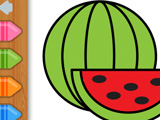
Fruit Paint lets kids pick a favorite fruit picture and fill it with color like a simple digital coloring book. Bananas, apples, and other fruit outlines wait on the screen, and each picture stays clear so kids can focus only on choosing colors and filling areas. The game quietly teaches which colors match common fruits while kids experiment and finish full pictures.
Kids tap a fruit, then tap a color, then drag the brush across the area they want to fill. The virtual brush is thick on purpose, so coloring inside the lines stays easy and quick, even for very young players. It is enough to move close to the edges without touching every tiny corner, and the fruit still looks complete. All main colors are available in the palette, so no picture stays half-finished. After filling every fruit drawing, players see a full gallery of colored fruit that looks neat and ready to show off or replay with different color choices.
How to play?
Choose a fruit picture from the menu, pick a color, then drag the thick brush over the areas you want colored. Switch colors any time from the palette to match real fruit shades or experiment with silly combos. Finish coloring the entire fruit before moving to another one for a cleaner result. Recolor the same fruit picture as many times as you want to try new color sets. Use Fruit Paint as a calm break between harder games or as a quick way for younger kids to practice matching fruits and colors.

About this game:
- Players have rated this game 3.99 out of 5, based on 1533 votes.
- Released in September 2020.
- Ready to play on Web Browser (PC) and Android/iOS (Mobile).
- Age rating: 3+
- Powered by HTML5 — jump right in and start playing in your browser, no downloads needed.
Game features:
- Thick brush width reduces precision needs and fits young kids’ hand movements.
- Fruit images stay as simple outlines that keep focus on color choice instead of small details.
- Finished colored fruits remain on screen as a mini gallery until players switch or restart.
Tips & Tricks:
- Start with bigger fruits like watermelon slices, since larger areas are easier to fill neatly.
- Use realistic colors first to help younger kids remember basic fruit shades.
- Replay the same fruit and swap colors to compare serious versions with fun versions.
Related Games:
 Pixel Mania
 Meme Coloring: Draw Popular Characters
 Happy Hamster Coloring
 Anti-stress Coloring for Adults ASMR
 Sandbox: Draw by Numbers
 Pick & Paint
 Super Coloring
 Pastel Color: Coloring Book for Girls
 ASMR Coloring Book: AI Kids
 Puzzle Painter
 Chibi Sup Color
 Pets Coloring Book
 Kim Possible Coloring Page
 Connect and Color
 Painting 3D
 Fashion Coloring Book Glitter
 Color the Pumpkin
 World of Coloring by Numbers
 Relax Coloring
 Spirit Riding Free: Animated Coloring Book
 Moana Coloring Book
 101 Dalmatines Online Coloring Page
 Mobile Phone Coloring Book
 Pencil Jam