
Coloring: Fun Colors
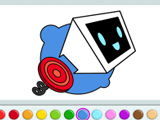
Coloring: Fun Colors lets players chill out with digital art, whether drawing from scratch or filling in ready-made line pictures. The coloring game includes playful images from different themes, so it fits quick doodles and longer drawing sessions. Night mode helps keep the bright screen from feeling harsh when coloring for a long time, which works well for late-evening art time.
Upload personal photos or images and turn them into custom coloring pages. This keeps the gallery fresh and makes it easy to recreate characters, pets, or simple selfie outlines using the same tools as the regular pictures. Finished works save directly to the device, and the game also supports printing, so pages can move from the screen to real paper without extra apps.
How to play?
Pick a drawing or coloring mode first. In free drawing mode, select a pencil or brush, choose a color from the large palette, then sketch lines, shapes, or simple graffiti-style tags. For classic coloring, tap one of the prepared images, then fill in the zones with solid colors. Mix brushes and shades to give characters' clothes, hair, or backgrounds clear color borders.
Switch the interface to night mode when the room is dim, since darker menus make long coloring sessions more comfortable. Save finished art to keep a growing collection of fun coloring pages, or print favorite drawings for a real-life folder or wall display. Load up Coloring: Fun Colors and turn blank outlines into a full digital art stash.

About this game:
- Players have rated this game 4.00 out of 5, based on 37 votes.
- Released in November 2022.
- Ready to play on Web Browser (PC) and Android/iOS (Mobile).
- Age rating: 3+
- Powered by HTML5 — jump right in and start playing in your browser, no downloads needed.
Game features:
- Players can upload personal photos and use them as custom coloring pages inside the same interface.
- A built-in night mode darkens the interface to make long coloring sessions more comfortable for the eyes.
- Finished drawings can be saved to the device and also printed directly from the game.
Tips & Tricks:
- Switch to night mode during long sessions to keep the bright interface from feeling tiring.
- Use different brush sizes when drawing to outline with thin strokes and fill areas with thicker ones.
- Save art often so updated versions of your coloring pages stay in your device gallery.
- Print a few favorite pages and color them again on paper with real pencils or markers.
Related Games:
 Roblox Coloring Game
 101 Dalmatines Online Coloring Page
 Shopkins Coloring Book
 New Year's Coloring Book 2025
 Monstrix: Color by Number
 World of Coloring by Numbers
 Drawing Christmas for Kids
 Cocomelon Coloring
 Flowers Coloring Book
 Painter
 Pets Coloring Book
 Ivanov Family: Coloring Book
 Coloring Creations Barbie
 Coloring Secret Garden
 Animal Artist
 Pompom Cheerleader Coloring
 Cars Coloring
 Rock Art
 Coloring of Objects 3D
 Color the Pumpkin
 Puss in Boots Coloring
 Toddler Coloring
 Happy Bride Coloring
 Coloring Multi Animal