
Elite Forces: The Clone Wars
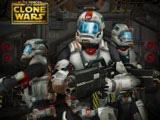
The barracks war in Elite Forces: The Clone Wars runs on clone numbers. Blue garrisons belong to your side. Red and green barracks hold hostile troops, and gray outposts stay neutral until someone claims them. Captured soldiers switch sides after a successful takeover. Larger bases can hold more units, so a huge barracks offers a bigger prize than a small one.
How to play?
Click a blue barracks, then pick a target to send an attack force. After the order, exactly half of that garrison moves out toward the selected base. On the battlefield, drag a circle around several enemy positions when you want to strike more than one at once. Press Ctrl to change the current selection without dropping the rest. Timing helps because splitting one base leaves fewer defenders behind until your troops arrive.

 - change selection
About this game:
- Players have rated this game 4.19 out of 5, based on 438 votes.
- Released in February 2015.
- Ready to play on Web Browser (PC) and Android/iOS (Mobile).
- Age rating: 10+
- Powered by HTML5 — jump right in and start playing in your browser, no downloads needed.
Game features:
- Send exactly half a garrison with every attack order.
- Claim neutral gray outposts before rival colors move in.
- Drag-select several targets to launch parallel assaults.
- Raid huge barracks for larger troop capacity after capture.
Related Games:
 Star Wars: Create a Chibi
 The Clone Wars: Galaxy of Heroes
 The Clone Wars: Life Fire
 Star Wars Puzzle Game
 X-Wing Fighter Game
 Rogue One: A Star Wars Story
 Star Wars Galactic Spy
 Star Wars: Republic Ace
 Star Wars: Clone Wars Adventures
 The Clone Wars: Sith Assault
 Star Wars: Fantastic Warrior
 Star Wars: Young Jedi Adventures Galactic Training
 LEGO Star Wars: Wars Battle Run
 Obby: Lightsaber Duels
 Sabine Wren Hospital Recovery
 Yoda's Jedi Training
 Yoda Battle Slash
 Lego Star Wars: Walker Adventures
 Star Wars Rebels: Chopper Chase
 Star Wars Rebels: Team Tactics
 Star Wars Rebels: Ghost Raid
 Star Wars: Droids Over Lego
 The Clone Wars: Sharpshooter Clone Training
 Star Wars Rebels: Strike Missions