
Teen Scream Freaky Fab Photo Shoot
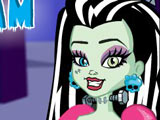
Teen Scream Freaky Fab Photo Shoot turns a Monster High campus session into a styling game with a camera at the end. Pick a backdrop first, then choose which student will pose for the picture. Before the shoot starts, look through her style and match outfits that fit her look. Add accessories, switch clothing pieces, and set up the final pose. You can also place her best friend or boyfriend beside her for a paired photo. When everything looks right, tap the camera and save the shot as a keepsake from school.
How to play?
Open the dress-up menu and browse the available wardrobe items. Click different tops, bottoms, dresses, and extras to change the character's outfit. Check the background options and place the model in the spot you want for the picture. Bring in a second character if you want a duo photo. Keep swapping pieces until the look fits the scene. Press the camera icon to take the final picture and finish the shoot.

About this game:
- Players have rated this game 4.30 out of 5, based on 1113 votes.
- Released in December 2013.
- Ready to play on Web Browser (PC) and Android/iOS (Mobile).
- Age rating: 8+
- Powered by HTML5 — jump right in and start playing in your browser, no downloads needed.
Game features:
- Pick a school backdrop first, then build the outfit around that scene
- Add a best friend or boyfriend to turn one pose into a duo shot
- Study a student's signature style before locking clothes and accessories
Related Games:
 Ghoulia Yelps Pregnant
 Monster High: Gigi Grant Dress Up
 Monster High Robecca Steam Dress Up
 Creepy Spa for Little Monsters
 Baby Monster Flu Doctor
 Monster High: Freaky Fusion
 Monster Hospital Recovery
 Operetta Tattoo Shop
 Monster High Vs Princesses Instagram Challenge
 Baby Monster Tooth Problems
 Plant Monster Princess
 Kiss in Monster High School
 Monster High MakeUp School
 Electrified Photo Booth
 Draculaura Dentist
 Pregnant Cleo de Nile Baby Shopping
 Monster Girls Rivalry
 Phoenix Princess
 Creepateria Food Fright
 Monster High Down of the Dance
 Monsters Date
 Howleen's Mystic Pizza
 Howleen Wolf in 13 Wishes
 Scaris Cafe Cart