
Kids Educational Laptop
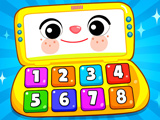
The screen lights up, the buttons flash, and you can tell there are lots of fun tasks ahead. In the Kids Educational Laptop, your child steps into a world of playful learning where everything is simple and straightforward. This is an educational game for kids, where learning feels calm and pressure free. Bright icons, large elements, and familiar shapes make it easy to understand what to do. It is simple to start and enjoyable to continue, because the activities are designed so that kids can succeed on the first try. The letters are clear, the numbers are easy to tell apart, the colors stand out, and the instant feedback shows right away if you chose the correct answer. This kids' learning simulator helps children move forward with confidence, build on what they already know, and feel like they are doing well. The game supports a winning mindset because the tasks are logical, the pace is relaxed, and the results appear immediately. There is no rush, no pressure, and you gradually pick up useful skills, moving step by step toward success.
How to play?
Open the mini games on your laptop screen and start right away. First, tap the letters and match them to the right pictures, then drag the numbers into the correct spots, checking both shape and size. In the color activities, you sort objects by placing them into the matching cells, then switch to shape exercises where you find exact matches. In the calm modes with pop it style elements, you simply press the buttons, let off a little tension, and get used to the controls. The goal is to complete the tasks correctly, unlock new exercises, and steadily reinforce what you know. You play at your own pace, try different activities, and return to the ones you liked most. It works well both solo and with friends, as you pass the controls and talk over the answers. Click, drag, check yourself, and move on. Good luck, and keep that winning spirit going.

About this game:
- Players have rated this game 2.77 out of 5, based on 13 votes.
- Released in December 2025.
- Ready to play on Web Browser (PC) and Android/iOS (Mobile).
- Age rating: 3+
- Powered by HTML5 — jump right in and start playing in your browser, no downloads needed.
Game features:
- Calm, pressure free learning experience with clear feedback after every action
- Mini games that match letters to pictures, numbers to slots, and colors and shapes to the right cells
- Pop it style modes that let kids relax while getting used to the controls
- Designed for both solo play and cooperative play by passing the device and discussing answers
Related Games:
 Monster Snake
 Mush Mush Leaf Gliding
 Rabbit Samurai
 Little Fire Masters
 Donutosaur 2
 Fish Tank: My Aquarium Games
 Fruit Escape
 Dr. McStuffin: Wash-Up Play Day
 Fluffy Runner
 Kim Possible Eco Challenge
 Team Umizoomi: Shark Car: Race to the Ferry
 Peppa Pig: Bat and Ball
 Whacky Races: Road Trip
 Snow Adventure
 Mindy's Moonball
 Robby: Escape The Rooms
 Froggie Jump
 Snoring: Winter Edition
 Greedy Rabbit
 Kids Hospital Doctor
 Pretty Little Princess Salon
 Kids Water Park
 Kids Food Cooking
 Camp with Pop