
School Simulator: My School
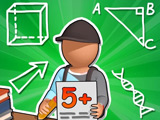
Build a school from the ground up in School Simulator: My School, beginning with 1 desk and 1 student. Each upgrade feeds the next step: more classrooms bring in more students, more students bring in more cash, and that cash lets you add restrooms, a cafeteria, and new staff. Early on, you handle the day-to-day work yourself, delivering pens and notebooks, collecting payments, and picking up trash after class. Later, assistants take over part of the workload while your school grows into a full campus.
How to play?
Buy the first classroom and place the first desk. When a student sits down, an icon above their head shows whether they need a pen or a notebook. Bring the item to begin the lesson. Once class is over, collect the payment and clean up the trash they leave behind, or the next student won't take the seat. Use your earnings to add desks one by one. When the upgrade menu appears, tap the icon next to the desk with the laptop to hire an assistant and improve your character. In the shop, swap skins and pick up a hoverboard for faster movement around the school. Fill the classroom with desks, then unlock the restroom and the second classroom as more children arrive.

About this game:
- Players have rated this game 5.00 out of 5, based on 1 votes.
- Released in May 2026.
- Ready to play on Web Browser (PC).
- Age rating: 3+
- Powered by HTML5 (Unity WebGL) — jump right in and start playing in your browser, no downloads needed.
Game features:
- Deliver pens or notebooks from student request icons to begin each lesson
- Clear trash after class or the next student can't use that desk
- Tap the laptop-side upgrade icon to hire assistants and boost movement
- Fill one classroom with desks before unlocking the restroom and second room
Related Games:
 Idle Firefighter 3D
 Spider Solitaire 2 Suit: Panoidl
 Idle Sculpt
 Idle Crafting: Empire Tycoon
 Unbridled Destruction of VAZ Cars
 Tasty Point - Fast Food Empire
 Carving Madness
 Island Idle RPG
 Cake & Candy Business
 Squidly Escape Fall Guy 3D
 Taxi Tycoon: Idle Business
 Bus Driving Simulator Idle
 Idle Medieval Kingdom
 Idle Egg Farmer
 Zombie Idle Defense 3
 Idle Megamall Empire
 Lemonade Factory: Idle Tycoon
 Idle Drugstore
 Idle Higher Ball
 Cat Planet Idle
 Idle Cars
 City Idle Tycoon
 Golden Hit
 Idle Pizza Empire