
Diy Joystick
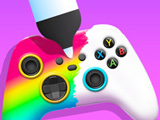
Players step into a custom workshop where they give old game controllers a fresh look. The main goal is to restore and upgrade each joystick, turning it into a standout console gaming accessory. Diy Joystick lets you handle every step, from cleaning and prepping to adding bold colors and unique decorations. The whole process is about creating a one-of-a-kind gamepad using a range of tools and effects designed for creative freedom.
Clients bring in their used controllers, and you work through several stages to transform each one. Start by choosing a base template that sets the shape and style. Next, select paint cans to lay down bright, even layers or blend shades for a marble effect. Stickers and decals add personality, letting you mix and match designs or focus on a specific theme. Each step is interactive—drag and drop tools, tap to apply colors, and adjust placement for the best look.
Upgrades don't stop at visuals. You can also swap out buttons and thumbsticks for fresh ones, making the joystick feel new in both appearance and function. The game is part of the girls' games genre, but anyone into controller design can enjoy it. Diy Joystick rewards attention to detail, letting you see the results as soon as you finish each step. Finished designs are saved to your gallery, so you can check out your creations or show them off later.
How to play?
Pick a joystick from the workbench to start. Select a template, then use paint cans or marble effects for the base layer. Apply stickers and swap parts utilizing the interface. Drag and tap to customize each section. Save your finished gamepad to the gallery, or take on the next client for more design options. Try new combinations to see different results with each project. The controls use simple taps and drags, making it easy to switch tools or undo moves. Keep experimenting to unlock more templates and decoration packs as you progress.

About this game:
- Players have rated this game 4.13 out of 5, based on 652 votes.
- Released in June 2022.
- Ready to play on Web Browser (PC) and Android/iOS (Mobile).
- Age rating: 6+
- Powered by HTML5 — jump right in and start playing in your browser, no downloads needed.
Game features:
- Players can swap out button sets and thumbsticks for functional upgrades.
- The gallery saves finished joystick designs for later viewing.
- Templates offer several controller shapes to match different console styles.
- Decoration packs unlock as players complete more customization projects.
Tips & Tricks:
- Try layering two paint colors for a smooth fade effect.
- Place stickers before swapping out buttons for easier alignment.
- Check the gallery to review all previous designs and get new ideas.
- Unlock new templates by finishing more projects in the workshop.
Related Games:
 Tatto Salon
 Girls Fashion Nail Salon
 Fashion Competition
 Bestie Wars
 Ellie And Friends Art Hoe Aesthetic
 Bffs Coffee Date
 Are Young Girl or Ancient Lady?
 Ballet Dancer Fitness Care
 Hidden Object: Girl and Cat
 Diamond Painting
 Downtown Doodle Fashion
 Anna's Story: Dress Up DIY
 Cross Stitching: Animals
 My Summer Juice Corner
 Prom Run
 Baby Zara Home Cleaning
 Dancing Idol: Clicker
 Sequins Simulator Colors by Numbers
 Cyberpunk City Fashion
 Shopaholic Black Friday
 Become a Disney Princess
 Family Town: Match-3 Makeover
 Black Friday Mystery Sale
 Lingerie Design: GlamLabs