
Cross Stitch 2
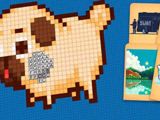
Cross Stitch 2 delivers a digital take on classic stitching, offering a big gallery of images to color. The collection sorts pictures by difficulty, so you can pick quick starter designs or go for more detailed ones when you want a challenge. The main goal is to fill in all the squares on the canvas, matching colors with the numbered pattern. Finished artworks unlock new options and let you see your progress over time. Each image stays saved, so switching between projects is easy without losing your work. You get a zoom tool for focusing on tricky spots or checking details. The layout keeps controls within reach, making it easy to pick colors and fill out the pattern. The game works with touch or mouse, letting you tap or click to fill each cell.
Color palettes appear alongside the canvas, and each number links to a specific shade. Finishing a picture adds it to your gallery, so you can view completed projects anytime. You can always return to any unfinished design and resume where you left off. Cross Stitch 2 is part of the girls' games genre, but anyone who likes coloring or pixel puzzles will find it relaxing.
How to play?
Pick an image from the menu, then use the palette to select a color. Tap or click the numbered squares to fill them in. Use the zoom feature for close-up work on detailed areas. Change pictures any time; your progress saves automatically. Explore new designs as you complete current ones.

About this game:
- Players have rated this game 3.90 out of 5, based on 186 votes.
- Released in May 2023.
- Ready to play on Web Browser (PC).
- Age rating: 3+
- Powered by HTML5 (Unity WebGL) — jump right in and start playing in your browser, no downloads needed.
Game features:
- Images are organized by difficulty, from basic to advanced patterns.
- A zoom tool helps focus on small or complex sections of the picture.
- Finished projects stay saved in your gallery for later viewing.
- You can switch between pictures without losing your work on any design.
Tips & Tricks:
- Start with simple patterns to get used to the color-matching system.
- Use zoom for detailed sections to avoid mistakes.
- Switch to a different picture if you want a break; your progress remains saved.
Related Games:
 Diamond Painting For Girls
 Glam And Glossy Summer Look
 Merge Dreams
 Hover Skirt
 Super Late
 Ibiza Foam Party
 Perfect Salon
 Nana DIY Dress & Cake
 Rapunzel Wedding Prep
 Embroidery
 Shopaholic Black Friday
 Influencer Choose My Style
 Body Salon Master
 Your Love Calculator
 Cute House Cleaning
 Ibiza Pool Party
 Ballet Dancer Fitness Care
 Play Pin Up Trend
 Little Lily St.Patrick’s Day Photo Shoot
 Social Media Influencers
 TikTok Supermodels
 Habbo Clicker
 Body Race
 Ellie And Friends Floral Outfits