
Geometry Wave: Online Editor
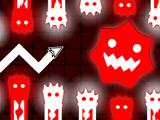
More than 65 preset levels are available in Geometry Wave: Online Editor, along with an online editor for making your own maps. Guide the wave through difficult routes, dodge spikes, and finish each run without crashing. Published creations can be shared with other players. Community maps can also be played and rated. Finished levels award stars, coins, and crystals. Crystals are spent in the store and in the editor.
How to play?
Hold the control to send the wave upward. Release it to drop downward. The wave shifts direction instantly, which makes path timing and movement spacing important on sharp routes. Watch the track layout ahead. Adjust the line early when spikes, tight passages, and abrupt bends appear. Practice mode is available from the pause menu. Finish runs, collect rewards, buy items, build tracks in the online editor, and share them with other players.
 /
/ /
/ - maneuver
 - Set a checkpoint
 - Remove checkpoint
About this game:
- Players have rated this game 3.00 out of 5, based on 6 votes.
- Released in August 2026.
- Ready to play on Web Browser (PC).
- Age rating: 3+
- Powered by HTML5 (Unity WebGL) — jump right in and start playing in your browser, no downloads needed.
Game features:
- Play through 65+ preset courses, then publish your own online maps
- Spend crystals in both the store and the level editor
- Rate community-made courses after finishing player-built runs
- Use Practice Mode from the pause menu to rehearse difficult sections
Related Games:
 Geometry Vibes Monster
 Xmas Dash
 Geometry Craft 3D
 Geometry Wave Hero
 Geometry Dash: Ufo
 Geometry 2.2
 Geometry Rush
 Geometry Dash Skibidi Toilet
 Fire And Water Geometry Dash
 Geometry Vibes 3D
 Geometric Dash Time to Travel!
 Neon Dash 2
 Among Dash
 Geo Dash
 Geometry Dash SubZero 2
 Level Devil
 Halloween Geometry Dash
 Geometry Dash: Lava Mode
 Geometry Dash: Impossible Wave
 3Dash
3Dash Geometry Stars
 Geometry Dash - Clicker
 Geometry Dash Full Version
 Geometry Dash: Avatar Game