
Drift Practice TopSpeed
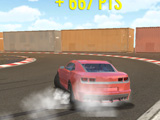
Porto's sunlit harbor streets turn into a closed training ground for controlled skids in Drift Practice TopSpeed. A tuned Chevrolet Camaro sits in the middle of the screen, ready for one thing only: clean drift lines and long, smoky slides on three dedicated practice tracks. This drift simulator focuses on simple car control, camera freedom, and repeat runs on the same circuits, so every lap feels clearer than the last. The Camaro body can be repainted in different solid colors, so the car stands out on screenshots and replays. A built-in AI driver runs side by side on the track, giving a constant visual target to chase or pace while working on tighter drift angles.
Three closed circuits form the core of this drift game. Figure 8 is the basic playground, shaped like the number eight with two looping sections. It works well for short donuts and linked drifts between the two halves of the track. The Oval track is a stretched circle with long straights and wide bends that let the Camaro stay sideways for extended periods. The Bridge track connects two loops with an elevated bridge so the layout forms another figure-eight shape, only taller and more complex. The bridge layout rewards smooth transitions and also leaves room for flashy slides and simple stunts that stay inside the barrier lines.
How to play?
Load the drift game and check the Camaro showcased in the center. Use the color options along the bottom edge to repaint the body before driving, then confirm the look. Pick a track from the three icons in the left corner: Figure 8, Oval, or Bridge. This instantly loads the chosen circuit without extra menus, so swapping layouts during a drift session stays quick. Control the view using the advanced camera system. Scroll the mouse wheel to zoom closer for precise tire placement or pull the camera back to read the entire corner entry. Toggle music off if it distracts, and keep only the engine sound active, which makes throttle changes easier to track by ear. Hit the gas, swing the rear of the Camaro out into a controlled skid, and keep the slide stable through each turn.
Hold drifts for as long as possible and chain corners to earn more points. Tap the brakes or lift the throttle gently if the drift angle looks too wide for the exit. Touching walls or barriers triggers visible damage on the Camaro body, so repeated crashes slowly turn the car from a clean showroom style into a heavily scraped practice machine. Run laps, follow the AI drifter as a moving example, and stack drift score until the control of the car feels consistent on each of the three tracks in Drift Practice TopSpeed. Finish a session by testing color changes or switching circuits to see how well the current drift skills carry from layout to layout. Jump in whenever there are a few spare minutes and treat Porto's Figure 8, Oval, and Bridge circuits as a personal drift pad to dial in long slides and steady control.
 - control
 - handbrake
 - zoom in/out the camera
About this game:
- Players have rated this game 4.14 out of 5, based on 59 votes.
- Released in February 2023.
- Ready to play on Web Browser (PC).
- Age rating: 7+
- Powered by HTML5 (Unity WebGL) — jump right in and start playing in your browser, no downloads needed.
Game features:
- Three fixed drift circuits based in Porto: Figure 8, Oval, and Bridge, all designed for repeat training runs
- A Chevrolet Camaro as the only drift car, with changeable body color before each session
- Active AI drifter sharing the same track to provide a constant pacing and visual reference
- Visible car damage that appears when the Camaro hits barriers or walls during drift attempts
Tips & Tricks:
- Start on Figure 8 to get used to switching drift direction between the two loops.
- Use the zoomed-out camera view on the Oval track to read corner entry earlier.
- Mute the music and focus on engine sound to hear when the Camaro is about to lose grip.
- Follow directly behind the AI drifter on the Bridge track to copy lines and braking points.
Related Games:
 Grocery Kart
 Stickmen Drift 3D
 Drift on a Vaz in Village
 Driving BMW M3 E96 Drift Car
 Winter Russian Drift
 Drift Zhiguli in Russia
 Russian Car Drift
 Night for Drift
 Snow Drift
 Drift No Limit
 Lamborghini Drifter
 Rublevka RP
 Sports Car Drift
 Drift King
 Mercedes Drift
 Nightfall Drifters
 Extreme Drift 3D
 Xtreme Drift 2
 Real Drift: Multiplayer
 Snow Tokyo Drift
 E30 Drift Simulator
 Extreme Car Drift on Mazda RX-7
 Drift and Hustle on BMW M5 F90 and M5 G90
 Drifting Descent