
Coloring by Numbers: Pixel Rooms
Coloring by Numbers: Pixel Rooms turns plain pixel layouts into finished rooms for a digital house, all through simple number coloring. First, you see an empty home with bare rooms, then you start giving it style by completing pixel art furniture and decor. Every finished object drops into its place, so the house slowly fills with colored sofas, shelves, lamps, and more. The whole game keeps the classic pixel look, so the final rooms feel like a complete pixel house you assembled yourself.
How to play?
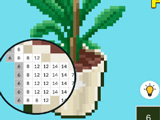
Pick any starting room from the home layout, for example, a living room or bedroom. The room appears like a design project, with furniture and decorations shown as separate pixel images. Choose one object to color first. The outline zooms in, and the image is split into tiny numbered squares. A color palette pops up at the bottom, and each paint shade in it corresponds to the same number of squares in the picture.
Tap a paint number, then tap or drag across all matching numbered pixels to fill them in. When all numbers on the object are filled, it instantly unlocks as a finished piece of furniture and appears in the room design. Some projects have many small pixels, so use boosters to fill larger areas faster instead of tapping one square at a time. Keep clearing new design projects to unlock more furniture, decorate more pixel rooms, and slowly complete the entire pixel house in this relaxing coloring game. Jump in and color another empty room until the whole pixel home matches your favorite style.

About this game:
- Players have rated this game 4.24 out of 5, based on 25 votes.
- Released in July 2024.
- Ready to play on Web Browser (PC).
- Age rating: 3+
- Powered by HTML5 (Unity WebGL) — jump right in and start playing in your browser, no downloads needed.
Game features:
- Completed pixel furniture automatically appears in the room layout once its coloring is finished
- Rooms unlock as separate design projects inside a single connected pixel house
- Every color in the palette has a fixed number that matches specific pixels in the image
- Boosters fill wide zones of numbered pixels to speed up long coloring sections
Tips & Tricks:
- Start with smaller furniture pieces to finish and place items in your pixel rooms more quickly.
- Zoom in on crowded areas of pixels to tap the correct numbers more accurately.
- Use boosters only on objects with a lot of tiny pixels to save time where it matters most.
- Finish all objects in one room before moving on so the house layout feels easier to track.
- Clear one color number at a time to avoid missing stray pixels in complex designs.
Related Games:
 Fruit Paint
 Anti-stress Coloring for Adults ASMR
 Baby Painting Game
 Sandbox: Draw by Numbers
 Scribble Malika
 Coloring: Pixel Art 2
 Happy Hospital Coloring
 Splash Art Autumn Time
 Mobile Phone Coloring Book
 Princess Coloring Glitter
 Cinderella Online Coloring Page
 Pick & Paint
 Happy Bride Coloring
 Just Coloring
 Color It in 3D
 Coloring Book For Kids
 Arty Mouse & Friends Coloring Book
 Flip Sponge
 Color Ice Cream
 99 Nights in the Forest Coloring Pages
 Dorothy Wizard Oz Splash Art
 Princess Glitter Coloring
 Stencil Art
 Luntik with Lantern - Coloring Page